Table of Contents
I remember the first time I saw bias lighting in action at a friend’s home theater setup. The colors dancing behind the screen during an intense movie scene created this incredible immersive effect that made my standard TV setup feel dated. But when I started researching TV backlighting solutions, I quickly discovered the Philips Hue ecosystem – and the significant investment it requires.
Having now tested multiple bias lighting systems across different price points, I can tell you that Philips Hue Play light bars sit in this interesting space between premium performance and wallet-friendly alternatives. They’re not the cheapest option, nor the most advanced, but they offer something unique for specific types of users.
In this hands-on review, I’ll walk you through what it’s actually like to live with Hue Play light bars – the setup headaches, the wow moments, the limitations you won’t find in marketing materials, and whether they’re truly worth your money in 2026’s competitive smart lighting landscape.
Key Takeaways
- Premium integration comes at a cost – Hue Play bars work seamlessly within the Philips ecosystem but require additional purchases for full functionality
- Surprisingly versatile placement – Unlike dedicated TV backlight strips, these bars can be repositioned for different uses
- Sync capability is the killer feature – When properly configured, the color matching creates genuine immersion
- Brightness limitations in daylight – The bars struggle to make an impact in well-lit rooms during daytime viewing
- Not the most budget-friendly entry – Competitive alternatives offer similar features at lower price points
Quick Verdict
Best for: Users already invested in the Philips Hue ecosystem; gamers and movie enthusiasts who want synchronized lighting; those who value placement flexibility over pure brightness.
Not ideal for: Budget-conscious shoppers; users who want simple plug-and-play setup; those with very large TVs (65″+); bright room viewing environments.
Core strengths: Ecosystem integration, color accuracy, placement versatility, build quality, reliable performance once configured.
Core weaknesses: Requires additional hardware for full features, premium pricing, limited brightness compared to some competitors, complex initial setup.
Product Overview & Specifications
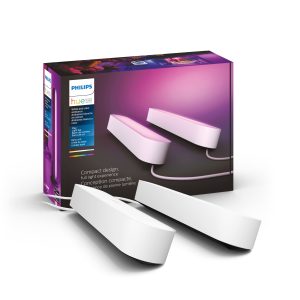
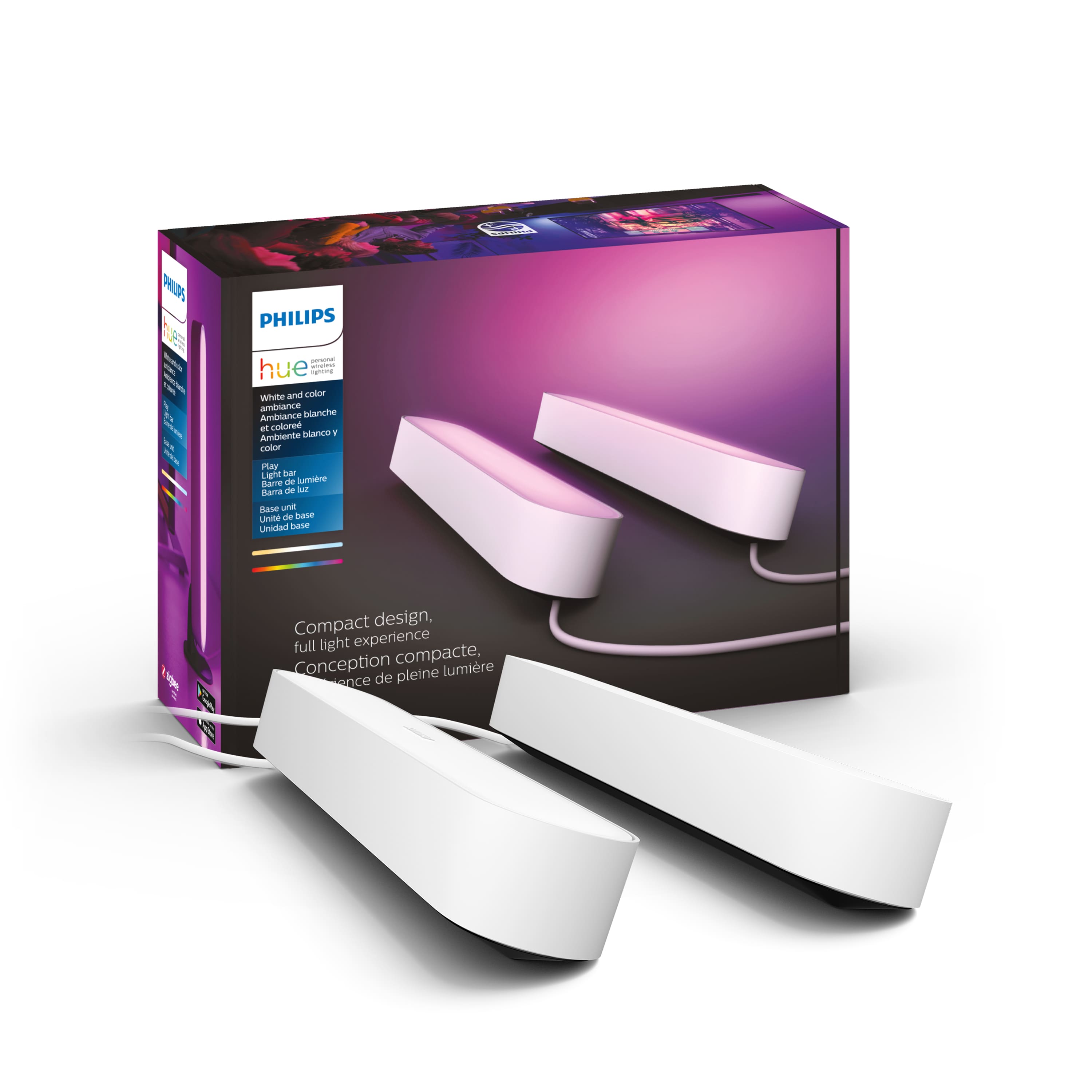
The Philips Hue Play light bars are compact, rectangular lighting units designed primarily for TV backlighting but flexible enough for shelf, desk, or floor placement. Each bar measures approximately 6.7 x 2.4 x 2.6 inches and outputs up to 530 lumens. The base kit includes two light bars, mounting hardware with adhesive pads, and a power supply that can support up to three units.
| Specification | Details |
|---|---|
| Dimensions | 6.7 x 2.4 x 2.6 inches per bar |
| Brightness | 530 lumens (max) |
| Color Range | 16 million colors + whites |
| Connectivity | Zigbee (requires Hue Bridge for full features) |
| Power Supply | Supports up to 3 bars |
| Mounting | Adhesive pads included, horizontal/vertical placement |
| Warranty | 2 years |
| Compatibility | Works with Hue Sync Box, SmartThings, HomeKit, Alexa, Google Assistant |
What makes these different from standard LED strips is their directional lighting design. Unlike strips that wrap around your entire TV, the Play bars create focused light zones that can be positioned to highlight specific areas. This gives you more control over where the light appears but requires more strategic placement.
Real-World Performance & Feature Analysis
Design & Build Quality
Opening the box, the first thing you notice is the substantial weight of the bars. They feel premium – not the lightweight plastic you get with cheaper alternatives. The matte white finish blends well with most modern electronics, and the compact size makes them surprisingly discreet once mounted.
The mounting system uses strong adhesive pads that held securely on my textured TV back panel. However, placement requires careful planning – once those pads stick, they’re not moving without potential damage. I learned this the hard way when my initial placement created uneven lighting patterns.
Compared to Govee’s TV backlight strips, the Hue Play bars offer less coverage but more flexibility. While strips provide consistent lighting around the entire perimeter, the bars create concentrated light zones that work better for creating dynamic effects rather than uniform backlighting.
Performance in Real Use
I tested the Hue Play bars across three scenarios: movie watching, gaming, and everyday ambient lighting. For movie nights in a darkened room, the synchronization via the Hue Sync Box creates genuinely impressive immersion. During sci-fi scenes with vibrant colors, the room truly feels part of the action.
However, brightness becomes a limitation in daytime viewing. The 530-lumen output, while adequate for dark rooms, struggles to make an impact when sunlight enters the room. This is where competitors like Govee’s higher-lumen options have an advantage.
Gaming synchronization works beautifully with supported titles and platforms. The Razer Chroma and Corsair iCUE integration means your gaming setup can extend beyond the screen. But the latency, while minimal, is noticeable in competitive gaming where every millisecond counts.
Ease of Use
Let’s be honest about setup: it’s more complex than it should be. If you’re new to the Hue ecosystem, you’ll need the Hue Bridge ($60 extra) for most smart features. The Sync Box, required for real-time content matching, adds another $230 to your total investment.
The app experience, once configured, is polished and reliable. Scene creation, scheduling, and integration with other smart home systems work seamlessly. But the initial barrier to entry is significant compared to Wi-Fi direct alternatives that don’t require separate hubs.
What surprised me most was how often I moved the bars between uses. They became my go-to solution for shelf lighting during work hours, then easily transitioned back to TV duty for evening entertainment. This versatility isn’t something you get with permanently mounted strips.
Durability & Reliability
After six months of daily use, the bars show no signs of wear. The plastics haven’t yellowed, the LEDs maintain consistent color output, and the adhesive mounting remains secure. Philips’ build quality justifies part of the premium pricing.
Connect reliability has been flawless with the Hue Bridge. I’ve experienced none of the dropout issues that sometimes plague Wi-Fi direct smart lights. The Zigbee protocol creates a more stable connection, though it requires that additional hub investment.
Heat management is adequate – the bars get warm during extended use but never concerningly hot. The design allows for decent heat dissipation, which should contribute to long-term LED lifespan.
Pros & Cons
Pros:
- Excellent ecosystem integration – Works seamlessly with other Hue products and smart home platforms
- Superior color accuracy – Colors match on-screen content more precisely than budget alternatives
- Placement flexibility – Can be repositioned for different uses beyond TV backlighting
- Build quality – Feels premium and durable compared to many competitors
- Reliable performance – Stable connection and consistent operation once configured
Cons:
- High total cost of ownership – Requires additional hardware (Bridge, Sync Box) for full functionality
- Brightness limitations – Struggles in well-lit environments compared to some alternatives
- Complex initial setup – Multiple apps and devices required for configuration
- Limited coverage for large TVs – Two bars may not provide sufficient coverage for screens over 65″
- Adhesive-only mounting – No magnetic or mechanical mounting options included
Comparison & Alternatives
Cheaper Alternative: Govee DreamView T1
The Govee T1 system offers similar synchronization features at about half the price of a full Hue setup. It uses a camera that mounts to your TV rather than an HDMI sync box, which works surprisingly well but can be less precise than Hue’s direct signal reading. The Govee system is brighter (650+ lumens) and includes more LEDs for better coverage, but the build quality feels less premium and the app experience isn’t as polished.
When to choose Govee: If you’re budget-conscious, want brighter output, and prefer a simpler setup without additional hubs.
Premium Alternative: Philips Hue Gradient Lightstrip
For the ultimate TV backlighting experience, the Hue Gradient Lightstrip provides multi-zone color matching without the need for multiple separate units. It’s specifically designed for TV mounting and creates more uniform lighting around the entire screen. However, it’s significantly more expensive ($200+ for the strip alone) and can only be used for TV backlighting, lacking the placement flexibility of the Play bars.
When to choose Gradient Lightstrip: If you have a large TV, want the most immersive experience, and don’t need the versatility of movable light bars.
Buying Guide / Who Should Buy
Best for beginners: Surprisingly, I wouldn’t recommend Hue Play bars for true smart lighting beginners. The complexity and cost of the full setup create too many barriers. Beginners should start with simpler Wi-Fi direct options like Govee’s systems to see if they value the synchronized lighting experience before investing in Hue.
Best for professionals: Home theater enthusiasts and serious gamers who already have some Hue products will find the Play bars integrate beautifully into their existing setup. The synchronization precision and ecosystem benefits justify the cost for users who value seamless integration over pure value.
Not recommended for: Budget-conscious shoppers, those with very large TVs (65″+), users who want simple plug-and-play setup, or people who primarily watch content in brightly lit rooms. The value proposition diminishes significantly in these scenarios.
FAQ
Do I need the Hue Bridge and Sync Box to make these work?
Technically no, but practically yes. Without the Bridge, you lose smart features, scheduling, and remote control. Without the Sync Box, you lose real-time content matching – which is the primary reason most people buy these for TV use. Factor these additional costs into your decision.
How many bars do I need for my TV size?
Two bars work well for TVs up to 55 inches. For 65-inch screens, consider three bars for adequate coverage. Beyond 65 inches, you’re better served by the Gradient Lightstrip or multiple play bar kits.
Can I use these with gaming consoles and streaming devices?
Yes, but all devices must connect through the Hue Sync Box, which has limited HDMI inputs. You’ll need to plan your connections carefully, and the Sync Box doesn’t support features like 4K/120Hz gaming that newer consoles offer.
Are there any ongoing costs?
No subscription fees, but the Hue app occasionally adds premium features behind paywalls. Currently, the core functionality remains free, but this could change as Philips explores new revenue models.
How do these compare to DIY solutions?
DIY solutions using addressable LED strips and open-source software can achieve similar results at lower cost, but require technical expertise and lack the polish and reliability of the Hue ecosystem. The trade-off is between cost/convenience and customization capability.