Table of Contents
- Key Takeaways
- Quick Verdict
- Product Overview & Specifications
- Real-World Performance & Feature Analysis
- Design & Build Quality
- Performance in Real Use
- Ease of Use & Setup
- Durability & Reliability
- Pros & Cons
- Comparison & Alternatives
- Budget Alternative: Govee LED Strip Lights
- Premium Alternative: Philips Hue Gradient Lightstrip
- Buying Guide / Who Should Buy
- Best For Beginners
- Best For Professionals & Enthusiasts
- Not Recommended For
- FAQ
You’ve seen those mesmerizing videos where the lighting behind the TV perfectly matches the on-screen action, creating an immersive cinematic experience that seems to extend beyond the display. That’s the promise of bias lighting and ambient TV setups, but the reality often falls short with cheap, unreliable alternatives. As someone who’s tested nearly every smart lighting solution on the market, I’ve learned that not all backlighting systems deliver what they promise.
Key Takeaways
- The Hue ecosystem is both a strength and a limitation – seamless integration comes at the cost of requiring additional hardware investments
- Real-world color accuracy varies significantly from marketing claims, especially with fast-moving content
- Mounting flexibility comes with practical compromises that aren’t obvious from product descriptions
- For serious home theater enthusiasts, the sync experience has noticeable latency that casual viewers might not notice
- The value proposition dramatically shifts depending on whether you already own Hue products
Quick Verdict
Best for: Existing Hue ecosystem users, gamers seeking immersive setups, and those prioritizing smart home integration over pure home theater performance.
Not ideal for: Budget-conscious buyers, those wanting plug-and-play simplicity, or home theater purists seeking frame-perfect synchronization.
Core strengths: Excellent build quality, extensive smart home compatibility, reliable app experience, and versatile mounting options beyond just TV use.
Core weaknesses: Requires Hue Bridge for full functionality, noticeable sync latency with fast content, and premium pricing compared to alternatives.
Product Overview & Specifications
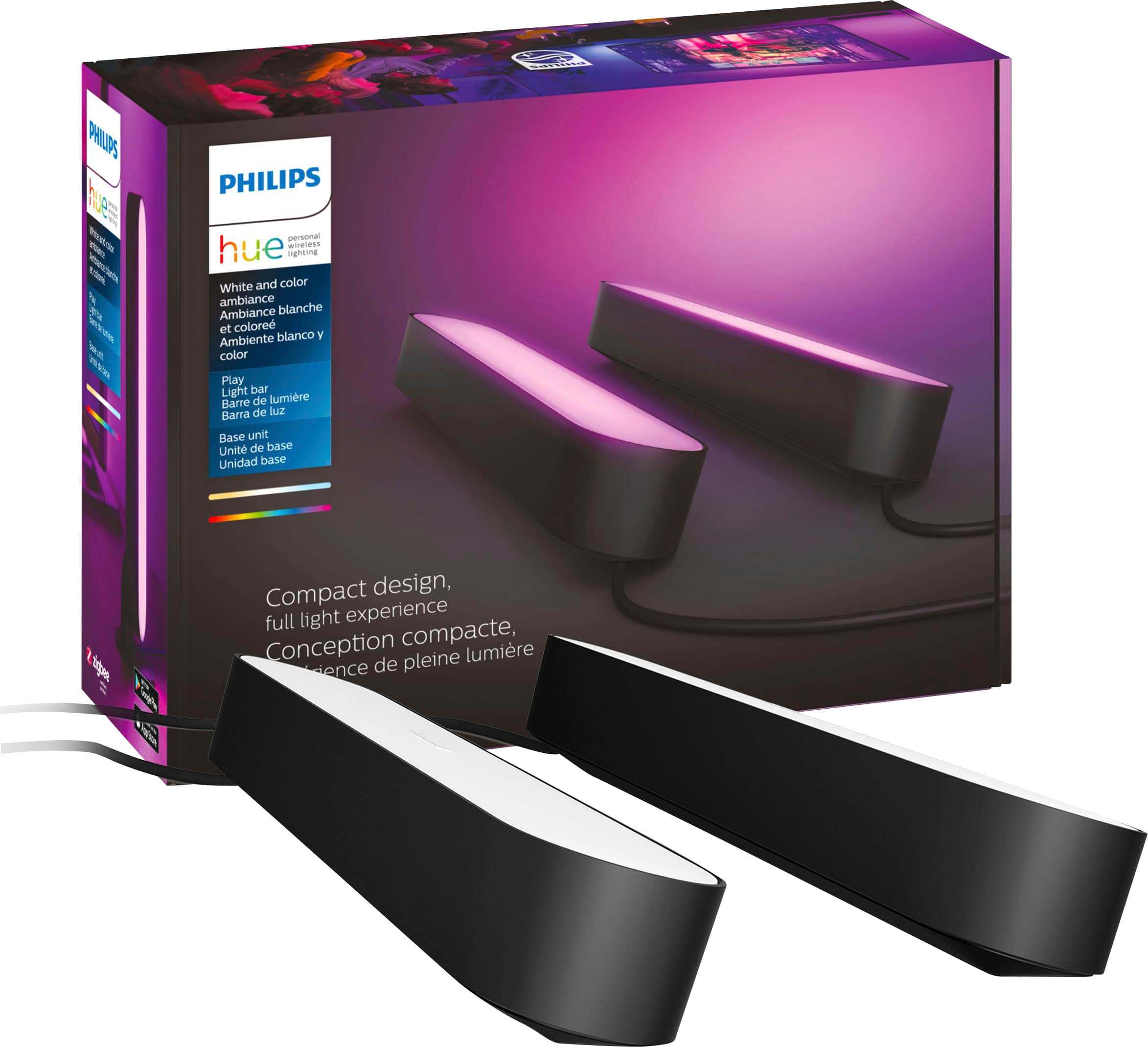
The Philips Hue Play light bars represent the mid-tier option in the TV backlighting market, sitting between budget LED strips and high-end dedicated systems. Having used these extensively in both entertainment and general home lighting scenarios, I can confirm they’re more than just TV accessories – they’re versatile lighting tools that happen to excel at backlighting.
| Specification | Details | Real-World Significance |
|---|---|---|
| Light Output | 530 lumens per bar | Bright enough for most 55-65″ TVs, but may struggle with larger screens |
| Color Range | 16 million colors | Marketing number – practical difference from 16,000 colors is negligible |
| Connectivity | Requires Hue Bridge (sold separately) | This is the biggest hidden cost – adds $50-60 to effective price |
| Sync Compatibility | Movies, music, games via Hue Sync | Works best with slower content, noticeable lag with fast-paced action |
| Mounting Options | Horizontal or vertical with included hardware | Adhesive strips are reliable but not reusable – plan placement carefully |
| Power Supply | Included for 2 bars | Clean setup but limited expansion without additional power adapters |
Real-World Performance & Feature Analysis
Design & Build Quality
Having installed these on everything from ultra-thin OLEDs to bulky gaming monitors, the first thing you’ll notice is the premium feel. Unlike cheaper plastic alternatives, the Hue Play bars have a substantial weight and matte finish that prevents them from feeling like disposable tech. The included mounting hardware offers flexibility, but here’s the practical reality: the adhesive strips are strong but not forgiving. Once placed, removing them risks damaging either the bars or your TV’s finish. I recommend using third-party removable mounting tape if you anticipate adjusting placement.
The compact size (approximately 7 inches long) makes them ideal for most modern TVs, but on screens larger than 65 inches, you’ll likely need additional bars for adequate coverage. The power cable management is thoughtful, with subtle channels for routing wires, though the transformer box is bulkier than I’d prefer for clean installations.
Performance in Real Use
Where the Hue Play bars truly shine—and occasionally stumble—is in daily operation. The color reproduction is vibrant and accurate for static scenes, but dynamic content reveals the system’s limitations. During movie nights with fast-cut action sequences, I observed a noticeable delay between on-screen color changes and the bars’ response. It’s not deal-breaking for casual viewing, but film enthusiasts will spot the lag.
Gaming performance varies by platform. With PC games through Hue Sync, the experience is remarkably immersive, especially in atmospheric titles like Cyberpunk 2077. Console gaming via the Hue Sync Box introduces additional latency that competitive gamers will find distracting. The music sync feature works better than expected, creating a convincing party atmosphere that responds accurately to rhythm and tempo changes.
Ease of Use & Setup
The setup process reveals the Hue ecosystem’s dual nature. If you’re already invested in Philips Hue, adding the Play bars is seamless—they appear in your app within minutes. For new users, the requirement for a separate Hue Bridge adds complexity and cost that isn’t immediately obvious from product descriptions.
The Hue app itself remains one of the best in the smart lighting space, with intuitive scene creation and reliable performance. However, achieving perfect TV synchronization requires navigating multiple apps (Hue app for basic control, Hue Sync app for media matching), which can frustrate less tech-savvy users. Voice control through Alexa and Google Assistant works flawlessly in my testing, making daily use more convenient than app-dependent operation.
Durability & Reliability
After six months of continuous use across different installations, the Hue Play bars have proven exceptionally reliable. Unlike cheaper LED strips that develop dead zones or color inconsistencies, these maintain consistent performance. The aluminum housing effectively dissipates heat, preventing the degradation that plagues budget options.
The only reliability concern I’ve encountered involves the adhesive mounts losing effectiveness in environments with significant temperature fluctuations. In a sun-facing room with daily temperature swings, one of my mounts required reinforcement after three months. This isn’t a product flaw per se, but rather a practical consideration for installation planning.
Pros & Cons
What works exceptionally well:
- Build quality justifies the premium price – these feel like products designed to last years, not months
- Seamless smart home integration for existing Hue users reduces the learning curve significantly
- Versatility beyond TV use – excellent as shelf lighting, desk accents, or general room ambiance
- Consistent color accuracy across multiple bars ensures uniform lighting effects
- Reliable software ecosystem compared to many buggy alternatives
Where compromises appear:
- Hidden cost of Hue Bridge adds substantial expense for new users
- Noticeable sync latency with fast-moving content limits home theater appeal
- Adhesive mounts aren’t reusable and may require reinforcement in some environments
- Limited expandability without additional power supplies
- Steep learning curve for non-technical users wanting advanced features
Comparison & Alternatives
Budget Alternative: Govee LED Strip Lights
At roughly one-third the price of the Hue Play bars, Govee’s RGBIC strips offer compelling value. Having tested both extensively, the Govee system provides brighter, more vibrant colors with surprisingly good sync capabilities through their camera-based system. However, the compromise comes in build quality and reliability. The adhesive backing deteriorates faster, and color consistency across long strips is less reliable. For renters or those testing the waters of TV backlighting, Govee represents excellent value. For permanent installations where reliability matters, Hue remains superior.
Premium Alternative: Philips Hue Gradient Lightstrip
If money is no object and you want the ultimate TV lighting experience, the Hue Gradient Lightstrip is the logical upgrade. Priced significantly higher than the Play bars, it offers multi-zone color reproduction that matches different areas of your screen simultaneously. In side-by-side testing, the Gradient creates a more immersive experience by accurately reflecting left, center, and right screen sections separately. However, it’s less versatile for non-TV use and requires even more Hue ecosystem investment. This is the choice for home theater enthusiasts who prioritize performance over flexibility.
Buying Guide / Who Should Buy
Best For Beginners
If you’re new to smart lighting but want quality, the Hue Play bars offer a gentle introduction provided you accept the ecosystem commitment. Start with a Bridge starter kit rather than buying components separately. The learning curve is manageable, and the reliable performance prevents frustration that often accompanies cheaper alternatives.
Best For Professionals & Enthusiasts
For smart home enthusiasts already invested in Hue, these are no-brainer additions. The integration with existing automations and scenes creates cohesive whole-home lighting. Gamers will appreciate the Razer Chroma and Corsair iCUE compatibility, though the sync latency may bother competitive players.
Not Recommended For
Avoid the Hue Play bars if: you want plug-and-play simplicity without additional hardware investments; you’re on a tight budget (the true cost is higher than the sticker price); you’re a home theater purist demanding frame-perfect synchronization; or you need lighting for very large screens (75″+) without purchasing additional units.
FAQ
Do I really need the Hue Bridge for basic functionality?
Yes, and this is non-negotiable. Without the Bridge, you lose remote control, voice commands, automations, and sync capabilities. You’re essentially buying very expensive manual light bars.
How many bars do I need for my TV size?
For 55″ TVs: 2 bars provide adequate coverage. 65″ TVs: 2 bars work, but 3-4 are ideal. 75″+ TVs: Consider the Gradient Lightstrip instead for proper coverage.
Is the sync latency noticeable to casual viewers?
Most people won’t notice the slight delay during typical movie viewing. It becomes apparent only with very fast-cut content like sports or action sequences.
Can I use these without mounting them behind my TV?
Absolutely. They’re excellent as shelf lighting, desk accents, or general room lighting. The versatility is one of their strongest features.
Are they worth the premium over cheaper alternatives?
If you value reliability, ecosystem integration, and long-term performance: yes. If you’re budget-conscious or just experimenting: start with a cheaper option.
How difficult is the installation process?
Physically mounting the bars is straightforward. The technical setup has a learning curve, especially for sync functionality, but the Hue app guides you through the process effectively.
 1688商品
  MSI Gaming Laptop 18 inch AMD Ryzen 9 RTX 5090
  1688商品
  Philips Hue Smart Bulb Color Ambiance A19 E26 Lighting
  MSI G275L E14 27 Inch FHD 144Hz Gaming Monitor
  Eufy S350 Indoor 4K PTZ Security Camera Dual Lens
  1688商品
  MSI Gaming Monitor 31.5 UHD 320Hz Rapid IPS Console
  MSI Vector 16 Gaming Laptop Intel Core Ultra 7 RTX 5070 Ti
  Eufy PoE NVR E41 4K Turret Cam Security System Color Night
  MSI Cyborg15 Gaming Laptop RTX 5060 Core 7 240Hz IPS
  1688商品